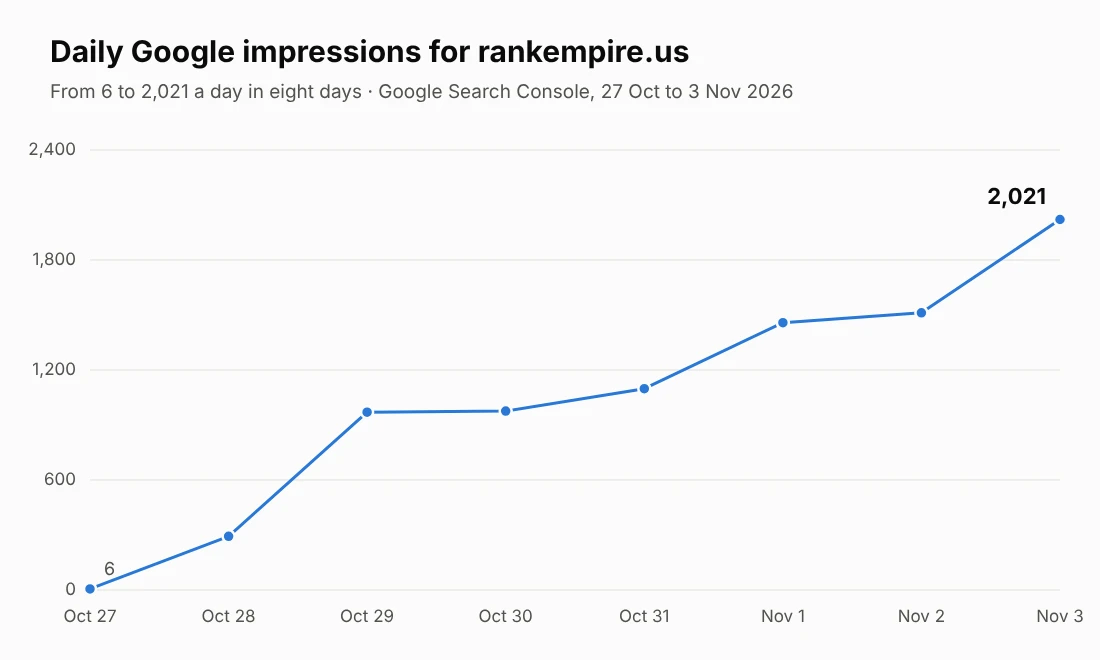
RankEmpire went from 17 indexed pages to 123 of 124, and from 6 Google impressions a day to 2,021 a day in eight days. This case study shows exactly what we changed, in the order we changed it, with the real numbers from our own Google Search Console. Nothing here is a mockup or an estimate, and the parts that have not worked yet are included too.
The starting point
The site launched with 124 pages: service pages, 51 industry pages, 17 city pages, free SEO tools and a blog. Google had indexed 17 of them. The rest sat in Search Console as "Discovered, currently not indexed" or "Crawled, currently not indexed", which is the most common state for a new site with little authority.
Step 1: Fix what tells Google a page is low value
Before asking Google to crawl more, we removed the reasons it might skip a page:
- Doubled brand names in titles. A layout template added "| RankEmpire" to titles that already ended with it. We switched every page to an absolute title.
- Near-duplicate sections. Several service pages shared the same intro blocks. The one page that stayed unindexed longest, International SEO, was fixed by giving it a distinct long-form guide and more internal links.
- Price contradictions. Some pages said local plans start at $799 while the pricing card on the same page said $599. We made every mention consistent.
Step 2: Split the sitemap and keep dates honest
One large sitemap became a sitemap index with four children: core pages (36), industries (51), locations (17) and content (20). Each URL carries a real last-modified date that changes only when the page changes. Split sitemaps make it obvious in Search Console which group is lagging, and honest dates give Google a reason to recrawl what actually changed.
Step 3: Build internal links like a hub and spoke
Orphan and weakly linked pages are the first ones Google ignores. We generated a related-links block for 92 pages: every industry page links to related industries, two cities and two guides; every city links to nearby cities; every service links to sibling services and posts. Blog posts link to the industry and city pages they mention. The weakest pages went from 3 internal links to 5 or more.
Step 4: Give every page something worth indexing
Thin pages rarely get indexed. We added three things to the pages with impressions:
- A direct answer block near the top, answering the question the page targets in two or three sentences.
- A long-form guide written for the exact searches Search Console showed for that page.
- Real proof, linking to verified Search Console reports on our case studies page.
Step 5: Structured data on every page
Every page now carries Organization data, a breadcrumb trail and, where relevant, Service, FAQPage, BlogPosting or WebApplication markup. Our checker reports zero errors across all pages. Structured data does not force indexing, but it removes ambiguity about what each page is.
Step 6: Submit, inspect and request
We resubmitted the sitemaps, ran URL Inspection on every route to find what was still excluded, and sent all 124 URLs through Google's Indexing API, plus IndexNow for Bing. Indexing moved from 17 pages to 123 of 124 in the weeks that followed, and impressions climbed from 6 to 2,021 a day within eight days of the push.
What has not worked yet
Impressions are not clicks. Over the last 28 days the site earned 8,334 impressions and 2 clicks, at an average position of 84. Google now knows what every page is about, but it does not yet trust the site enough to rank it on page one. That trust comes from links and mentions on other sites, which no amount of on-page work replaces. Our next phase is earning those links, as described in our link building approach.
What to copy for your own site
- Check Search Console's Pages report first and fix duplicates and thin pages before submitting anything.
- Split large sitemaps by page type and keep last-modified dates honest.
- Make sure every important page has at least five internal links from relevant pages.
- Add a direct answer, specific details and real proof to each page you want indexed.
- Validate structured data with a schema checker and a sitemap checker.
- Expect impressions to move weeks before clicks.
If your pages are stuck in "Discovered, currently not indexed", our free SEO audit includes the same indexing review we ran here.
FAQ
How long does it take Google to index a new website?
Small, well-linked sites are often indexed within days. Larger new sites with little authority can wait weeks or months for most pages. Fixing duplicates, internal links and sitemaps, then requesting indexing, usually shortens that from months to weeks.
Why are my pages "Discovered, currently not indexed"?
Google found the URL but decided crawling it was not worth the effort yet. Common causes are low site authority, thin or duplicated content, weak internal linking and too many similar pages. Improve those, then resubmit the sitemap.
Does the Google Indexing API work for normal pages?
Google officially supports it only for job postings and livestream pages. It often speeds up crawling for other pages, but it does not guarantee indexing or rankings. Fixing page quality and internal links matters more.
Why do I have impressions but no clicks?
Impressions at positions 50 to 100 mean Google shows your page deep in the results, where almost nobody scrolls. Clicks start when pages reach the first page, which usually requires links and mentions from other sites on top of good on-page SEO.
If this guide was useful, add RankEmpire as a preferred source on Google to see more of our articles in Top Stories.
Make RankEmpire a preferred source on Google
SEO strategist and funnel builder with 12+ years in search. Leads every RankEmpire account personally: the audit, the 90-day roadmap and the monthly call.
See the verified Search Console results or request a free SEO audit.
 SEO Strategy
 SEO Strategy
 SEO Strategy